

|
Quantity
|
Total
|
||
|
|
|||
|
|
|||
Dental laboratory scanners — selection and configuration
A laboratory 3D scanner digitizes physical models, dies and compatible impressions for restoration design. Desktop systems scan an object on a platform; intraoral scanners operate directly in the mouth.
Select equipment and request a quotation
State your method, workload and required options to prepare a comparable quotation.
Choosing a laboratory scanner
- Accuracy under defined conditions, scan area and access to complex geometry.
- Support for articulators, implant scan bodies and impressions.
- STL/PLY export, color texture and CAD compatibility.
- Computer, licenses, calibration targets and holders.
Scanning provides the digital input for dental milling or 3D printing. Required libraries and software packages are checked before ordering; scan speed does not represent the full workflow duration.
Model in the catalogue and comparison checklist
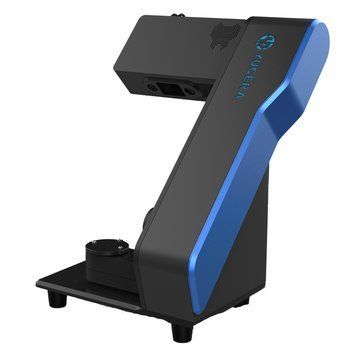
Yucera RS300 dental laboratory scanner
| Configuration review | What to check in the specification |
|---|---|
| Item 1 | Accuracy under defined conditions, scan area and access to complex geometry. |
| Item 2 | Support for articulators, implant scan bodies and impressions. |
| Item 3 | STL/PLY export, color texture and CAD compatibility. |
| Item 4 | Computer, licenses, calibration targets and holders. |
These details relate to this model listing. Confirm options and the final configuration against the delivery specification; follow the link for the current price or quotation request.
Configuration, pricing and procurement
For a quotation, specify the required configuration, number of instruments, installation city and services needed. Agree options, consumables, commissioning and staff familiarisation separately. Documentation, delivery times and warranty terms are specified in the quotation and contract. See the model page for its current price or quotation request option.
Questions before selection and procurement
How should the equipment fit clinic and laboratory workflows?
Agree materials, working instruments, software and interfaces. For digital workflows, check file formats and licences; for material processing, verify permitted programs and accessories. Record compatibility for the exact configuration.
Which model can I review in this category?
Yucera RS300 dental laboratory scanner. The listing provides specifications, version details and a way to request pricing. Compare quotations using the exact model name and option list.
What should be considered for the RS300 configuration?
The factory designation is YRC-RS300; the publicly priced offer also labels the model YRC-RC300. Holders, calibration accessories and scanning software are agreed for the selected package. Compatibility with exocad does not imply that a CAD license or computer is included in the price. Actual workflow time depends on the object, repeat scans and data processing.
How should a procurement specification be prepared?
Use the criteria in this dental laboratory scanners guide and add your operating, installation and compatibility requirements. Separate essential functions from preferred options, and specify quantities, documentation and acceptance criteria to compare complete configurations.